What is it?
The ultrasound image of the probe is of poor quality. There seems to be either noise or a shadow cone on a part of the image.
How to investigate?
The first thing to do is to determine how exactly is the image poor quality.
If the whole image has poor quality, you can try to check if there is noise in the image (see images below). If so, try to get an ultrasound image in another environment (i.e in another room).
The probe can be sensitive to other machines or even some ceiling lights, sometimes resulting in electromagnetic noise on the ultrasound image.
_crop.png?width=249&height=347&name=1829AB1081%20(002)_crop.png)
.png?width=206&height=349&name=EL00-168%20(003).png)
Image with background noise Image without background noise
- If only a part of the image has poor quality, check if there is a shadow cone on the ultrasound image (see image below). To do it, you will need a metal rod (a screwdriver can also work).
- Connect the probe to the Trinity
- Wet the head of the probe with water
- Place the rod on the probe so that it is orthogonal to the ultrasound lens (located inside the head of the probe).
- Move slowly the rod along the lens (see images below). Observe whether discontinuities appear on the image.
If you observe discontinuities, please take screenshots and attach them to the form.
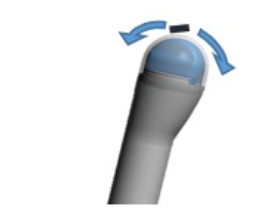
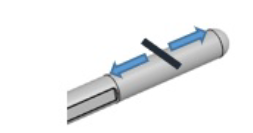
Metal rod on a transrectal probe Metal rod on a transperineal probe
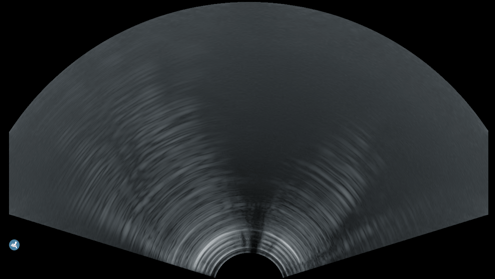 Ultrasound image with shadow cones
If the image quality is poor during the 3D acquisitions, check this article.
How to solve?
Depending on the cause of the issue, the probe might have to be replaced. Koelis Service team will perform the final diagnosis and will come back to you quickly.